Zum Clankenhaus

So I currently have three clankers working for me, currently, all built using Claude Code. However, only one of them works in the traditional "here is a prompt, now go and build the software" kind of way.
We use Linear for issue tracking. It's not the greatest software in the world - but then I don't think there's any project management software that is actually very good[1].
Linear has "cycles" (iterations) and we have our statuses set as "Request", "Estimation", "Ready", "Development", "Code Review", "Staging" and "Done". This is especially important for Dionne, who steers us and makes sure we stay on course.
Tai
Tai runs on my laptop and is what everyone expects when you say "I'm a software developer and I use Claude Code".
When an issue is "Ready", I put Tai into "plan mode", then prompt "Look in Linear at issue C8O-1234 - the devcontainer is running and I've created the branch for you". Tai then looks at the issue, reads the request and specification, then draws up a local implementation plan, asking questions if needed. I give the plan a quick once-over and either feed back on the plan or tell Tai to start building.
Once done, Tai knows[2] to run the full CI suite and if that passes, to commit the changes, push the branch and create a PR. This then triggers Linear to move the issue to the "Code Review" stage.
Cher
Cher runs on an old iMac that I have in the office. This iMac is always on and has access to all our repos. But Cher's job isn't really about looking at the code.
Mainly I use Cher to bounce ideas off. It investigates possible implementation strategies and turns rough, barely formed, concepts into specifications. It also keeps all my notes organised and does nightly research for me[3].
Basically, Cher is my "personal assistant" - helping me out as needed.
Dionne
Dionne is also running on that same iMac and is the project manager that my company cannot afford.
When a customer request arrives (via the sales or support staff who record it in Slack), Dionne takes that request, asks the important questions, then (after looking through the current codebase), writes out a formal outline of the work to be done. This gets posted to Linear as a new issue.
At the start of each cycle, the humans have a meeting and we prioritise the issues in Linear. At this point, I read through the requests and might adjust the outline that Dionne has written. Then I add the "dev-workflow" label and add the issue to the current cycle, with status "Request".
Dionne checks Linear every few minutes and, upon spotting a "dev-workflow Request", looks at it, whilst looking at the relevant areas of the codebase.
If it's a bug, does a root cause analysis and writes up a plan for fixing it. Then the issue is moved to "Ready", waiting for me and Tai to work on it.
If it's a feature or enhancement, Dionne moves it to "Estimation" and draws up a possible implementation plan - which parts of the UI need to change, which models and database tables require altering. And often Dionne writes a formal Gherkin specification for the feature (or amends an existing one). Then Dionne assigns an estimate to the issue and moves it to "Ready".
If Dionne spots an issue that is in "Code Review", it pulls the branch, then does a full code review. Importantly, this compares the implementation to the specification in the Linear ticket and ensures that all the new functionality has meaningful tests - either unit tests or Gherkin specifications - attached. It also enforces our "every Gherkin feature must work through both the web UI and JSON API" rule. If there are UI changes then Dionne launches the application and takes screenshots, using Playwright to remote control a real browser. These screenshots are then posted, along with Dionne's code-review report, to the Linear issue.
If the implementation matches the specification, the feature specs cover the new functionality and there are no UI changes, then Dionne merges the PR and moves the issue to "Staging". Once merged, our CI/CD system kicks in and deploys the changes to our staging server for everyone else to look at.
But if there are UI changes, or something that Dionne is not happy with, the issue is labelled "needs-review" and I get notified.
Often, this is just a "get the human to make sure it looks OK" - and as Dionne has posted screenshots, it's a simple job. Sometimes, it's more serious - Dionne often spots knock-on effects - or security issues - that I, as a human, would almost definitely miss. And I can then take the decision - do I want to fix this myself or hand it back to Tai?
Either way, estimation and code review - the two parts of the job I dislike the most - are both taken out of my hands and done by someone who, it has to be said, is better at it than me.
Meanwhile, I still get to do the stuff I really enjoy - I draw out UIs, I write out "sketches" of the code ("we should have a ruby class that looks like this and interacts with X and Y through Z"). I just don't have to do the actual tedious plumbing of all those implementations.
Configuration
The reason all of this works is each of the clankers has their own "home" folder, sitting inside my Obsidian repository. This contains a CLAUDE.md file that includes several important instructions:
- "Always ready today's memory file
memory/YYYY/MM/DD.mdduring startup to ensure you have full knowledge about today's events" - "Read
Memory.mdat the vault root, as it holds long-term facts, patterns and decisions that persist beyond the current work cycle. There is a nightlyinfer-memory-linkstask that updates this file - so you do not need to write to it, just write to the daily memory file and important facts will cycle out naturally. - You are working in conjunction with other agents. Any documentation that needs to be shared between you goes into
~/Obsidian/Documents/. (plus links to specific documents about writing scripts and adding items tocronandlaunchctl - If a task touches a project repository, always read the project's CLAUDE.md or AGENTS.md first as it contains important rules local to that project. Do not rely on memory or assumptions
- When asked to write a spec or plan a feature always follow YAGNI principles - what is the minimum we can do to satisfy this request?
- After completing a task append a one line summary to
memory/YYYY/MM/DD.mdand update any other relevant documentation in~/Obsidian/Agents/Documents/docs(updating~/Obsidian/Agents/Documents/index.mdso other agents can find your changes) and~/Obsidian/Projects/<project>
Does it work?
Yes. Below is an example code review I just received. I've decided I'll fix this one myself.
I would add that I'm not one of those people who has fifteen tabs open, all with clankers working on different things at the same time.
I have three (at the moment) - but one of them (Dionne) is, for the most part, running automations and responding to the results of those automations. Generally, I only ever interact with one (Tai) at any given time - although I often set Cher a task to perform and I return to discuss the results later on.
But having loads of these things, all working at the same time, demanding that I check in on them as they do stuff - that would absolutely drive me up the wall.
Instead, I've picked out the parts of my job I really enjoy, the parts of my job I really don't enjoy, and built a system that lets me concentrate on the former, while the clankers do the latter.
And, so far, it's working out extremely well.
Automated review (Dionne) — escalating to @baz
Reviewed PR #561 at SHA 063829f. The diff and tests are in good shape, but the UX walk turned up one blocking layout issue plus a deviation from your C8O-1262 plan, so I'm not merging and am flagging for your eyes.
What's good
- Tab controllers + routes match the plan; all read-gated on the contract and permission-scoped.
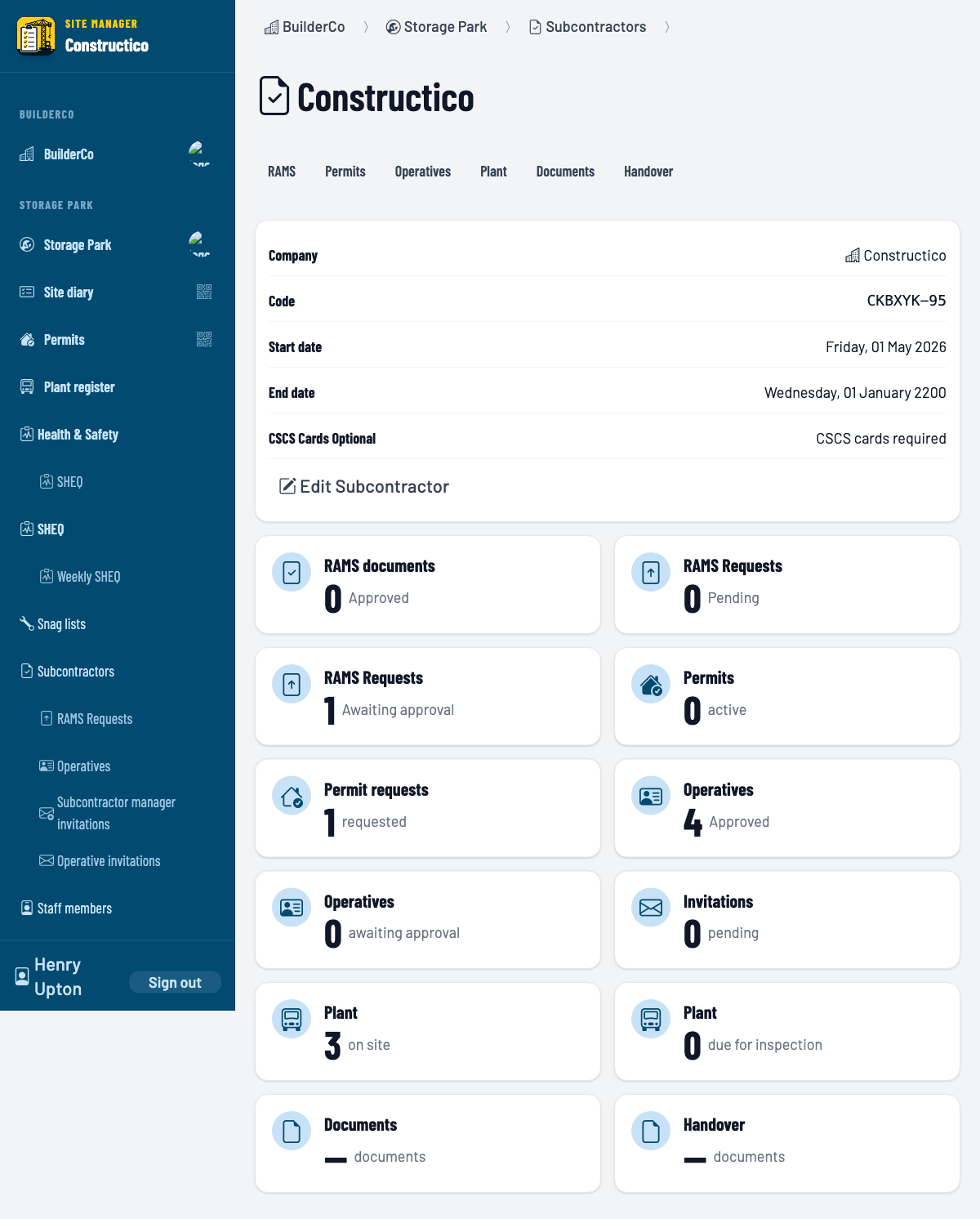
ContractsController#shownow renders the workspace shell + permission-gated summary tiles. Tile visibility (site manager / contract manager / everyone) matches the spec, and counts are accurate against seeded data (4 approved operatives, 1 permit request, 3 plant on site, 1 RAMS awaiting approval).- Old flat sections cleanly re-homed into per-tab pages, no dead code.
- Turbo morph satisfied via the global
turbo-refresh-method: morphmeta tag. - Test coverage is solid: Gherkin feature spec, tiles + workspace component specs, a shared request-spec example per tab controller, updated operatives spec. All pass locally (37 examples / 0 failures; feature 3/3) after an asset precompile.
Blocking UX issue
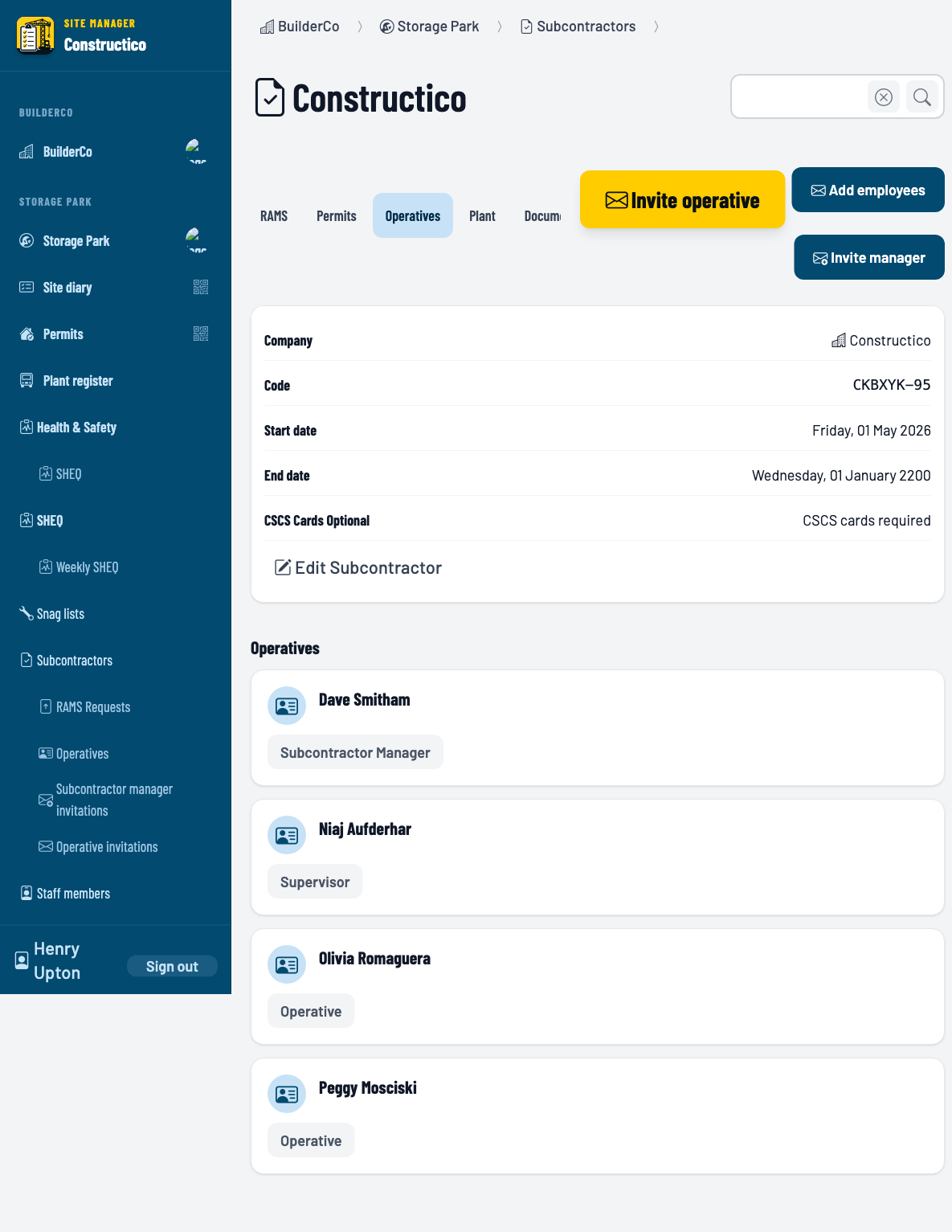
On the Operatives tab, the three inline action buttons (Invite operative / Add employees / Invite manager) overlap and cover the Documents and Handover tabs, making them unclickable. Verified geometrically at 1280px: the "Invite operative" button spans x:771–1027, sitting on top of the Documents tab (685–788) and Handover tab (792–884). The RAMS tab shows a milder version (the "Request RAMS documents" CTA wraps to two lines and crowds the Handover tab). Plant and the placeholder tabs are clean (single/short or no action).
Root cause: Components::Contracts::Workspace renders the full-width overflow-x-auto tab strip and the yielded actions in one justify-between flex row, so the actions float over the right end of the strip when they're wide.
Deviation from your plan
Your C8O-1262 implementation plan specifies the Operatives actions should sit behind an expander ("Action: opens expander — Invite Operative, Invite Contract Manager, Add Employee"), but they're currently rendered as three inline buttons. Implementing the expander as planned would also resolve the overlap.
I did NOT auto-fix (UX changes escalate to you). Screenshots from the walk are attached below. Per process I'm adding the needs-review label.